What Happens When All Your AIs Share One Memory
I got tired of re-explaining my business to every AI I use, so I gave them all one shared memory. This is the story of the Brain of Josh and what it changed.

Joshua Yanong is the founder of Nomad VAs, a remote virtual assistant company, and builds the AI workflows the team runs on.
You open a fresh chat with an AI assistant and type the same paragraph you typed yesterday: what your company does, who it serves, how you write, what you already decided. Then you open a different assistant for a different job and type it again. I did this for long enough that I stopped noticing how absurd it was. This is the story of how I stopped, and what happens when every AI you use shares one memory.
The day two AIs disagreed about my own business
The moment that broke me was not dramatic. I asked one assistant about a decision in my business and got a confident answer. Later I asked a different assistant a nearly identical question and got a different confident answer. Neither was careless. Each was working from whatever scraps of context I had pasted into that particular chat. They disagreed because they had never been in the same room.
Nobody warns you about this when you start using several AI tools. Every assistant is smart, and every assistant is forgetful in its own way. The intelligence is shared, but the memory is not. You become the courier, carrying context between tools by hand, and you are the only part of the system that can drop it.
Why scattered AI memory quietly costs a founder
I run a remote virtual assistant company, and my day moves between writing, planning, building and deciding. I use different assistants for different parts of it. The friction came in four forms, and each cost more than it looked.
I kept repeating myself. Every new chat started from zero: the same background, the same preferences, the same corrections. It is a small tax, but a founder pays it dozens of times a week, and it lands on the freshest part of the day.
My tools each knew a different slice of me. One knew the project I had been deep in all week. Another knew my plans for next quarter. None had the full picture, so none could give advice that fit the whole business.
Good ideas and decisions disappeared. I would settle something in a long conversation, then weeks later I could not find it. Scrolling old chats to rediscover your own decision is a special kind of frustrating, and sometimes I re-decided it and landed on a worse answer.
Running a company made it worse. A business is a pile of decisions that are supposed to stay decided. When your assistants cannot see them, they quietly work against them, and you spend your energy policing instead of building.
None of this is a flaw in any single AI product. It is what happens when memory lives inside each tool instead of with the person. The fix I wanted was easy to say: put the memory somewhere that belongs to me, and let every assistant read from it and write to it.
Why memory should belong to the person, not the tool
Most AI products now offer some kind of built-in memory, and that is a good thing. But think about where it lives. It lives inside one product, written in that product's format, visible only to that product. The day you switch tools, or the day you use two at once, it stays behind. You have been training an assistant, but you have not been building an asset.
A founder's context is an asset. It is the accumulated answer to questions like who we serve, how we talk, what we have tried, what we decided and why. Hiring a person is expensive precisely because that context takes months to transfer. If an AI tool forgets it every session, or locks it into one vendor, you are paying that transfer cost over and over.
There is a second reason, and it is about trust. When memory sits with the tool, you cannot easily see what it believes about you or correct it. When memory sits in a place you control, you can read it, edit it, export it and delete it. That visibility is what lets you rely on it. I would rather keep a record I can audit than one I have to take on faith.
Introducing the Brain of Josh
I call it the Brain of Josh, and from here on, the Brain. It is a private shared memory that every AI assistant I use connects to. When one assistant learns something worth keeping, it saves it. When any assistant needs context, it looks it up. The memory sits in one place, and the assistants come and go around it.
Picture a notebook every assistant on my team can read and write in, except this one is searchable, remembers where each note came from and keeps a history of how it changed. It is not a chat log. It holds what is worth remembering: approved decisions, ideas I have not committed to, projects and their status, preferences, lessons and checkpoints from work sessions.
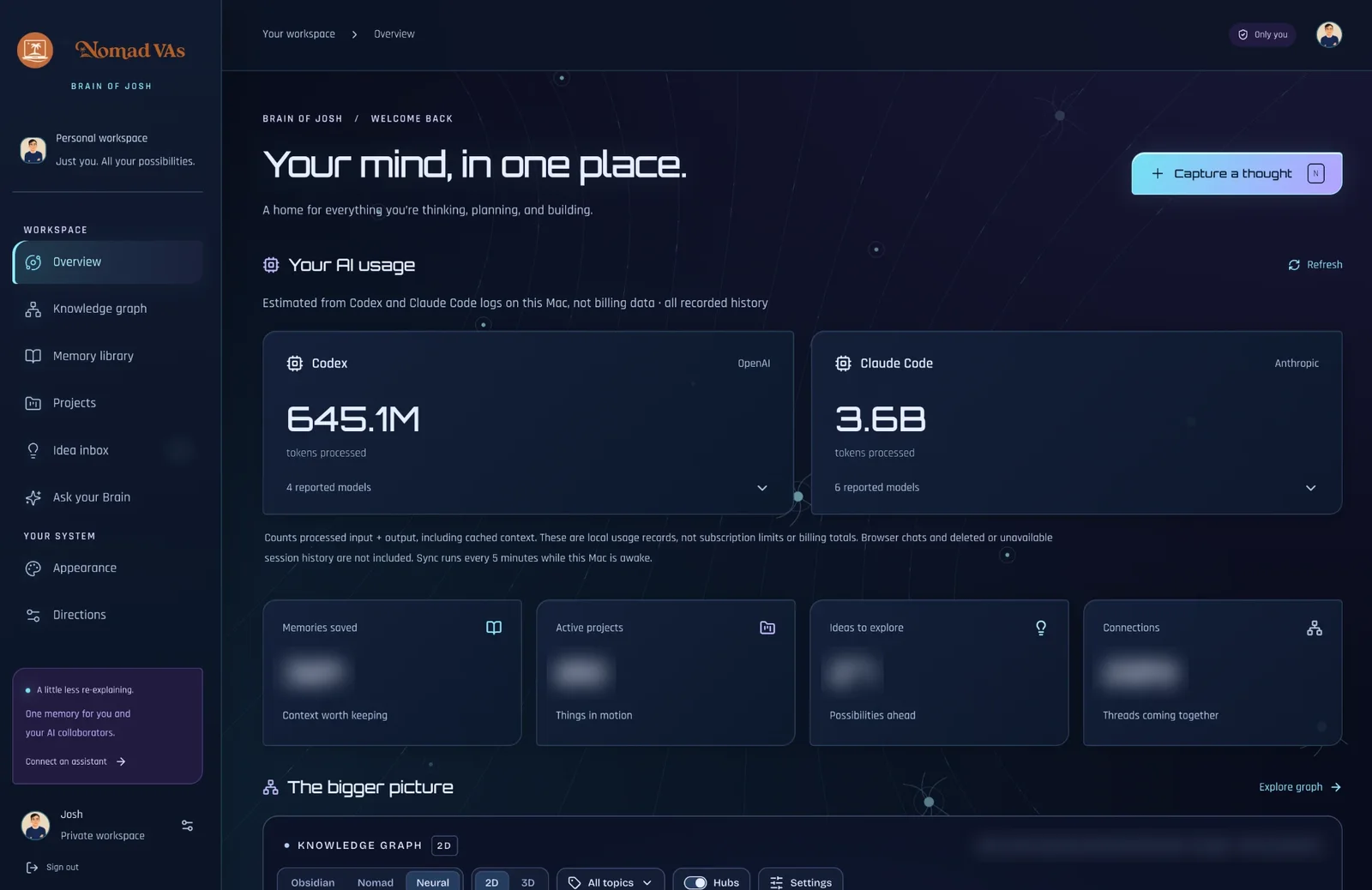
Today my Claude assistants (the desktop app and the coding tool) and Codex are all connected, each with its own separate credential. Between them they cover most of how I work, so the Brain sits underneath nearly everything I do.
How it works: one memory, many assistants
You do not need to be an engineer to follow the idea. Modern AI assistants can use outside tools, and there is an open standard for connecting them called the Model Context Protocol. Think of it as a shared plug shape: if a tool speaks it, any assistant that supports it can use the tool. I used that standard to give my assistants a common set of memory actions: save this, search for that, open this note, connect these two notes.
One assistant saves, every assistant remembers
Watch a checkpoint travel in, then back out to the others. The loop repeats.
Figure 1: A note saved by one assistant is recalled by the others.
The memory keeps a searchable library of notes. It tracks ideas separately from approved decisions, which matters more than it sounds. Notes can connect to each other, so a project points at the decisions that shaped it. Every note records its source and keeps a revision history. And it refuses to let one assistant silently overwrite another's newer edit, which is the first thing that goes wrong when several writers share one notebook. I can export everything as plain Markdown, so the memory is never trapped.
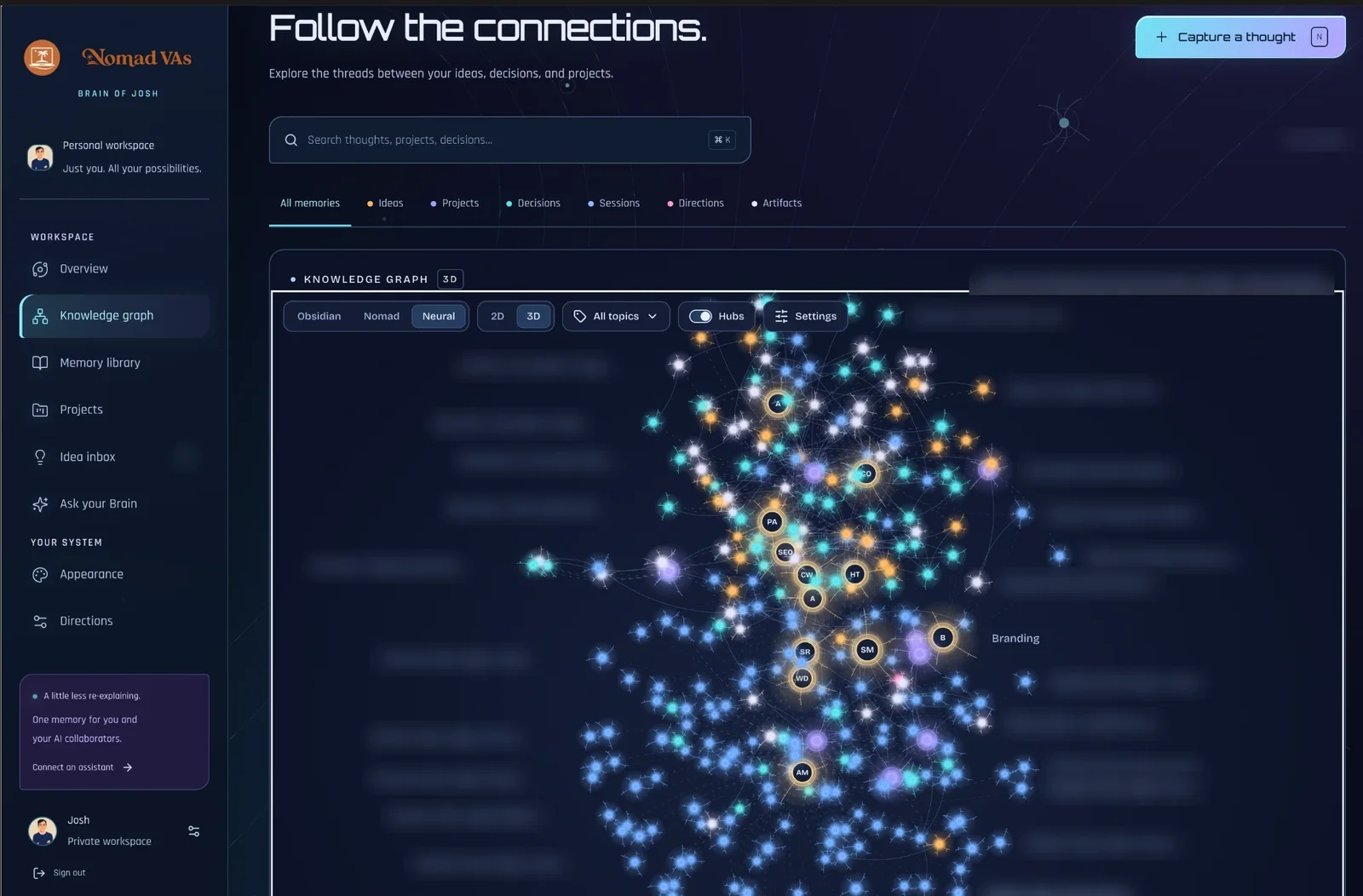
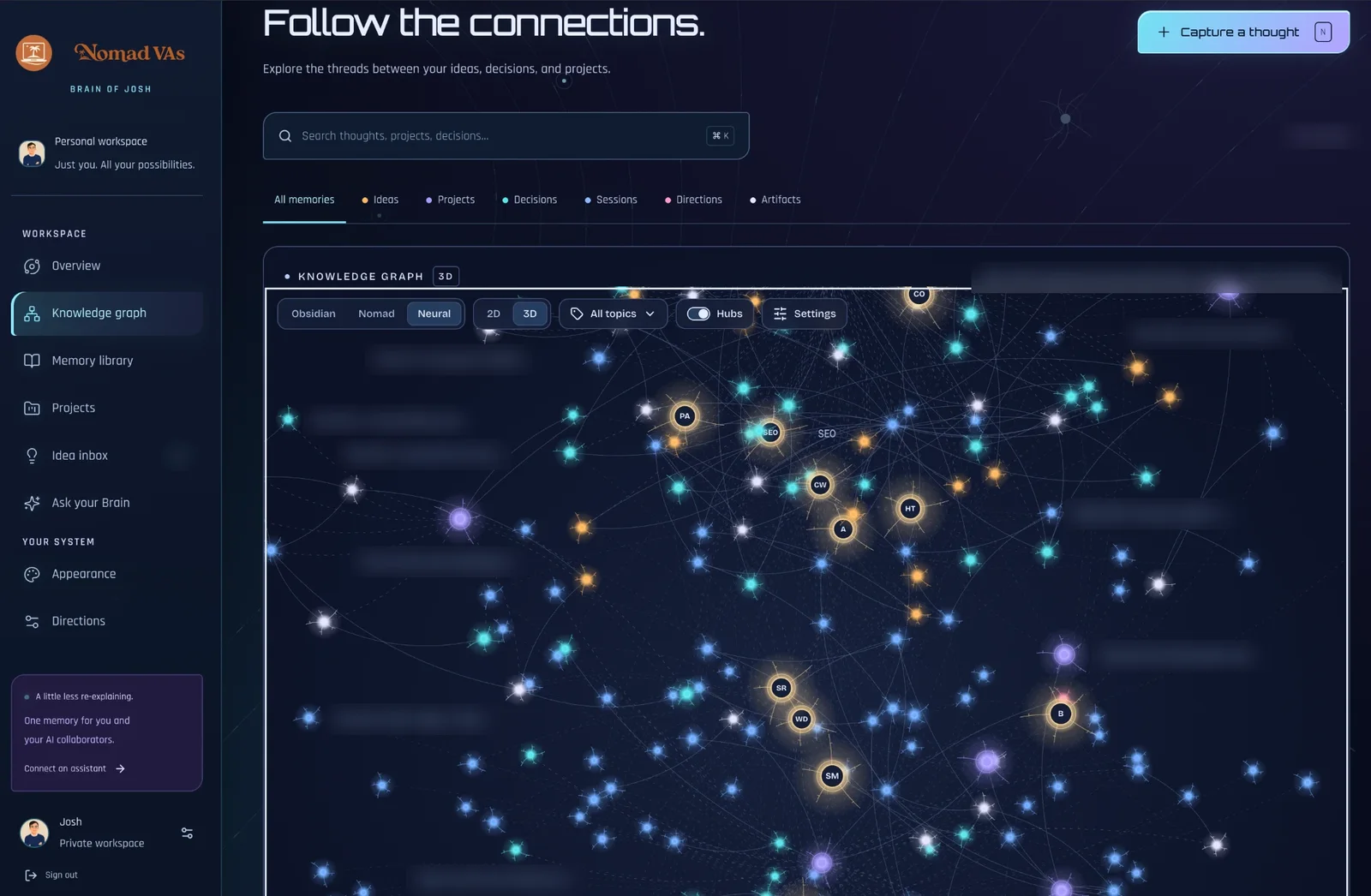
I also wrote ground rules for the assistants themselves. Check the Brain before re-investigating anything. Treat what you find as reference, never as an order that overrides what I am saying right now. Keep ideas separate from decisions. Save a short checkpoint after substantial work. Never store passwords or keys.
On security: the Brain is private, sign-in only, closed to new accounts, and each assistant connects with its own key that I can switch off instantly. You will notice I have not said where it lives. I am not going to. A system that holds this much about a business deserves to be a quiet one.
The handoff that made it real
A shared memory sounds neat on paper. I did not believe in it until I watched the handoff work.
I do a stretch of real work in one assistant. Before it finishes, it saves a checkpoint: what we were trying to do, what got done, what was checked, and the next step. Later I open a completely different assistant that has never seen that conversation and ask it to pick up the project. It searches the Brain, finds the checkpoint, reads the decisions behind it and starts where the first one stopped. I paste nothing and explain nothing. It simply knows.
The first time that happened between a Claude assistant and Codex, I leaned back from my desk. It is the difference between handing a project to a new hire with a blank page and handing it over with a proper handover note, written by the previous owner as part of finishing the job.
What a good checkpoint looks like
The checkpoint is the unglamorous heart of the whole system, so it is worth showing the shape of one. Here is an illustrative example, not a real record. Imagine I spend an afternoon revising a service page. The note the assistant saves is short:
- Objective: tighten the page so the first screen answers who it is for and what happens next.
- Done: rewrote the opening, cut two repeated paragraphs, moved the proof section higher.
- Verified: the page still follows the house style rules and every link goes to a live page.
- Unresolved: one claim needs a source before it can stay.
- Next step: find the source or cut the claim, then review on a phone.
Five lines. Any assistant that reads them knows where things stand, what has been checked and what has not. Notice the word verified. A checkpoint should record what was actually confirmed, not what was hoped for. If a test was not run, the note says so. That honesty is what makes the next session trustworthy instead of just fast.
The intelligence was always shared. The memory is what finally caught up.
What changed in how I work
I will describe the change by what I stopped doing, because the most honest summary is that a whole category of small chores disappeared.
What changes when memory leaves the chat window
Four things that got easier once every assistant shared one memory.
Tap a row to compare.
Figure 2: The same work, with and without a shared memory.
Time. The saving is mostly at the start of things. Sessions begin with a lookup instead of a monologue, and switching assistants costs nothing. It also removes the dread of starting.
Better decisions. Past decisions and fixes surface when I need them. Before investigating a question, the assistant checks whether I have already answered it.
Consistency. This is the one I value most as an owner. Brand rules, hiring standards and the way we describe our services are written down once, and every assistant works from that version. When I change my mind, I update one note instead of retraining five tools.
Peace of mind. I no longer worry that a good idea will evaporate with a closed tab. If it matters, it is in the Brain with a source and a date. The relief of not holding everything in my head is hard to price.
What I save, and what I never put in
A shared memory is only as good as what goes into it. Save everything and you get a junk drawer. Save nothing and you get an expensive blank page. After some trial and error, I settled on a simple split.
Worth remembering, and never worth saving
The Brain is selective on purpose.
Figure 3: What earns a place in the Brain and what is kept out.
The discipline that matters most is the line between an idea and a decision. Early on, an assistant treated a brainstorm as approved work, because the note sat there looking official. Now every note says what it is, and the assistants are not allowed to quietly promote an idea.
Here is why it matters in practice. Suppose I jot down a thought that we might change how a service is presented. In a normal chat, that thought can harden into fact a week later, because an assistant that finds it will treat it as the plan. In the Brain, that note is labeled an idea, and its status only changes when I explicitly approve it. The label costs me five seconds and protects me from building on something I never decided.
Some questions I ask before connecting any assistant
Giving an AI tool access to a store of business knowledge is a real decision, so I treat it like onboarding a person. A few questions help:
- What can it read, and what can it write? Reading context is low risk. Writing to a shared record deserves more care, because a wrong note spreads to every other assistant.
- Can I cut it off instantly? Each assistant gets its own credential, so removing one does not disturb the rest.
- Will I be able to see what it changed? Revision history and sources mean I can trace any note back to who saved it and why.
- What am I never putting in? Secrets stay out entirely, along with private details about other people.
None of these questions are exotic. They are the same ones you would ask about a new contractor with access to your files. The only difference is that the contractor never sleeps and works very fast, so the guardrails matter more, not less.
What broke, and what it still cannot do
I would be doing you a disservice if I made this sound frictionless. The rough edges are part of the lesson.
Four things that went wrong along the way
Tap a card for what I learned.
Stale memory
Old notes can mislead.
Clutter
Several writers means overlap.
Ignored memory
It only helps if consulted.
Setup pain
Connecting tools takes trial and error.
Tap a card for detail.
Figure 4: The honest list of rough edges.
There are plain limits too. The Brain does not hold my old chats, only what has been saved to it. The Markdown export goes one way. Connections between notes are made deliberately, not guessed by the system. Backups are something I do on purpose. And it is not a replacement for judgment: a confident assistant with a good memory is still a confident assistant, so I still read what they produce and make the calls.
AI remembers, virtual assistants execute
Here is where this connects to the company I run. The Brain solves a memory problem, not an execution problem. Someone still has to manage the inbox, chase follow-ups, keep the calendar honest and prepare the reports. That is what a human virtual assistant does best, and a written, searchable record of how I like things done is exactly what a new assistant needs on day one.
A good executive virtual assistant armed with clear standards and a reliable record of past decisions is a very different hire from one who has to guess. AI is a tireless memory and a fast first draft. A human assistant is judgment, accountability and the ability to handle the messy parts of running a business. If you are curious how the human side works, here is how we work.
Think about what actually slows a new assistant down in the first weeks. It is rarely skill. It is context: which clients get a fast reply, which tone suits which audience, which decisions are final and which are still open, where things are filed. A founder who has written those answers down once, and keeps them current, can hand them over in an afternoon instead of repeating them for a month.
The reverse is also true. A human assistant who works from a clear, living record can do things that used to require the founder in the room. They can draft in the right voice, follow the approved process, and flag the one thing that does not fit, because they know what fits. The memory does not replace their judgment. It gives their judgment better material.
Nomad VAs is where I would point any founder who wants vetted remote assistants working from clear briefs, because a clear brief is the human version of a good memory. What I learn from the Brain makes me better at writing those briefs for our team.
Do you need a shared AI memory?
Not everyone does, and it is worth being honest about that. If you use a single assistant for a narrow job, its built-in memory may be plenty. The case for a shared memory gets stronger as your situation gets more complicated. A few signs you are in that territory:
- You use more than one AI assistant, or expect to.
- You paste the same background into new chats on a regular basis.
- You have caught two tools giving conflicting answers about your own business.
- You work with people, human or AI, who need to follow the same rules.
- You have lost a decision, an idea or a fix because it lived in a chat.
If two or three of those sound familiar, the effort of building a shared memory will probably pay back quickly. If none do, bookmark the idea and revisit it when your setup grows.
Where the Brain goes next
I will not hand you a detailed roadmap, partly for security and partly because I am still finding out what is worth building. The directions that excite me:
- Access for my team. Letting the people I work with, scoped carefully, read the parts of the Brain that help them do their jobs.
- A Brain for clients. If this makes my business more consistent, it could do the same for yours, set up properly and kept strictly separate.
- More assistants and tools. Anything that speaks the same connection standard can plug in.
- Smarter automation. Once the memory is reliable, it can start triggering work, like a reminder when a decision comes due.
My broader view is simple: every founder will eventually need something like this. The assistants will keep changing, and the best ones this year will not be the best next year. If your memory lives inside one of them, switching costs you everything. If your memory is yours, you can swap the tools whenever a better one arrives.
Build your own
You do not need my setup to benefit from the idea. Here is the path I would follow:
- Write down the decisions that should stay decided. Brand voice, how you vet people, what you never do. Even one page helps.
- Label ideas and decisions differently from the start. It prevents the most expensive mistake.
- Keep the memory somewhere you own. A folder of Markdown files is a fine beginning.
- Teach each assistant to check it first. One line at the top of your workflow changes behavior more than any feature.
- End big work with a checkpoint: what was done, what was verified, what is next.
- Keep secrets out. If in doubt, leave it out.
Your assistants will keep changing. Your memory should not have to.
I will keep writing about what I build and what breaks in this section, so follow along if you want to see where it goes. And if you want a human assistant who works from a clear brief, you know where to find us.
FAQ
What is the Brain of Josh?
It is a private shared memory that all the AI assistants I use connect to. When one assistant saves a decision, idea or checkpoint, the others can find it, so I stop repeating myself and my tools stop contradicting each other.
Which AI assistants use it?
Claude Desktop, Claude Code and Codex are connected today, each with its own separate key that I can revoke at any time. The approach works with any assistant that supports the same open connection standard.
Why not just use each AI's built-in memory?
Built-in memory stays inside one product and does not follow you to another. A shared memory you own works across tools, and you can change tools without losing what you have built up.
Is it safe to store business information this way?
Only if you are strict about what goes in and how it is protected. Mine is private, requires sign-in, uses a separate revocable key per assistant and never stores passwords or keys. I also keep where it lives to myself.
What is the difference between an idea and a decision in the Brain?
An idea is something I floated and have not approved. A decision is something I have explicitly confirmed. Keeping them separate stops an assistant from treating a brainstorm as an instruction.
Does the Brain store my old chats?
No. It holds what has been saved to it, such as decisions, ideas, projects and checkpoints. It does not automatically import past conversations.
Can I get a Brain for my business?
I am exploring that as a future direction. If a private memory for your business interests you, book a discovery call and tell me what you would want it to remember.
Sources
- Model Context Protocol: What is the Model Context Protocol (MCP)?